When we approach a subject like this, we have to decide what level of depth we will use and which audience it is aimed at.
A computer program, at the end of the day, is an input that will tell the computer what to do.
Computers speak in 0’s and 1’s and we speak something else and programs are a conversion of what we say and how we understand it into 0’s and 1′, better yet, into the computer machine instructions.
Wikipedia has it very right when it says:
“A computer program in its human-readable form is called source code. Source code needs another computer program to execute because computers can only execute their native machine instructions. Therefore, source code may be translated to machine instructions using a compiler written for the language. (Assembly language programs are translated using an assembler.) The resulting file is called an executable. Alternatively, source code may execute within an interpreter written for the language.”
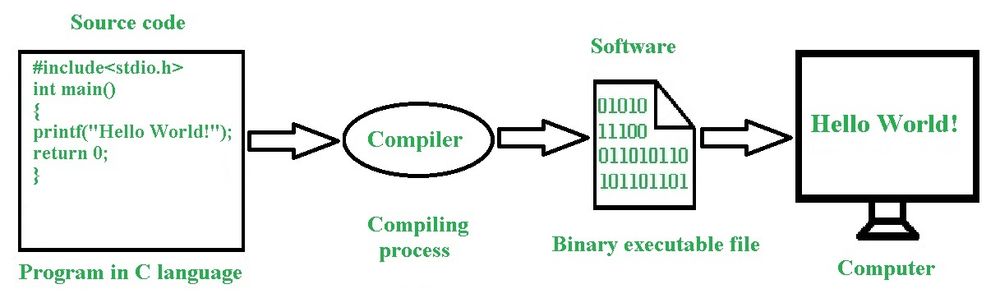
What you see there is the top of a very deep iceberg and does not show several programs that allow this program in the figure to offer this understanding image.
Bearing in mind that the level of complication this post is designed for non-professionals, we will add what is not appearing and we will just improve our level of understanding and not go as far as would be necessary to really reflect what is behind all this. What is at stake is abstraction as it is understood in computing and it dictates how much of the iceberg is needed to be seen for whatever purpose you have in your mind inputting something that you want to be processed in a computer. This whole post is an abstraction and before we delve into it, let’s take a look at abstraction:
Abstraction in Computing
Abstraction in computing is a fundamental concept that involves simplifying complex systems by hiding the details and exposing only the essential features needed for a particular purpose. This allows developers to manage complexity by focusing on higher-level functionalities without needing to understand the intricate workings of the underlying system.
Key Concepts of Abstraction
- Simplification:
- Abstraction reduces complexity by stripping away the less relevant details, allowing developers to work with simplified models or representations.
- Focus on Essentials:
- It emphasizes the essential characteristics and functions of an entity or system, enabling developers to concentrate on what is necessary to achieve a task.
- Levels of Abstraction:
- Computing systems can be viewed at various levels of abstraction, from low-level hardware details to high-level application logic.
Levels of Abstraction in Computing
- Hardware Abstraction:
- Transistors and Gates: At the lowest level, abstraction starts with electronic components like transistors, which are abstracted into logic gates.
- Processor Architecture: Abstractions at this level include registers, ALUs, and other components that form the CPU.
- Machine Language: Binary code instructions that the CPU can execute directly.
- Operating System and System Software:
- Kernel: Provides an abstraction over the hardware, managing resources like CPU, memory, and I/O devices.
- Device Drivers: Abstract the hardware details of devices, allowing the operating system to communicate with peripherals in a standardized way.
- Programming Languages:
- Assembly Language: Provides a low-level abstraction over machine language, making it easier to write and understand code for specific hardware.
- High-Level Languages: Languages like Python, Java, and C++ provide higher levels of abstraction, allowing programmers to write code that is more human-readable and portable across different systems.
- APIs and Libraries: Abstract complex functionalities into reusable modules and functions, simplifying development.
- Software Design and Architecture:
- Data Structures: Abstract complex data relationships into manageable entities like lists, trees, and graphs.
- Algorithms: Provide abstract solutions to computational problems without needing to specify the exact steps for all input cases.
- Design Patterns: Offer abstract templates for solving common software design problems.
- User Interface:
- Graphical User Interface (GUI): Provides an abstraction over the system’s functionality, allowing users to interact with software through visual elements like buttons and menus.
- Command Line Interface (CLI): Abstracts the complexities of system commands into simpler, user-typed text commands.
Examples of Abstraction
- File System:
- Users interact with files and folders, an abstraction that hides the complex details of how data is stored on physical media.
- Networking:
- Protocols like TCP/IP provide an abstraction that hides the complexities of data transmission, enabling reliable communication over the internet.
- Virtual Machines:
- Abstract the hardware and operating system, allowing multiple operating systems to run on a single physical machine as if they were on separate hardware.
- Object-Oriented Programming (OOP):
- Classes and Objects: Abstract real-world entities into classes, which define properties and behaviors, and objects, which are instances of these classes.
- Cloud Computing:
- Abstracts the underlying infrastructure, allowing users to deploy applications and manage resources without worrying about physical hardware.
Benefits of Abstraction
- Manage Complexity:
- Simplifies the development process by breaking down complex systems into manageable parts.
- Promote Reusability:
- Encapsulates functionalities in reusable components, reducing duplication of effort.
- Enhance Maintainability:
- Easier to update and maintain abstracted systems because changes can be made at one level without affecting others.
- Facilitate Communication:
- Provides a common language for developers to discuss system functionalities without needing to delve into the underlying details.
- Increase Productivity:
- Allows developers to build applications faster by focusing on higher-level functionalities and using abstracted components.
Summary
Abstraction is a powerful concept in computing that simplifies complex systems by focusing on the essential details while hiding the underlying complexities. It is used at various levels, from hardware and operating systems to programming languages and user interfaces, enabling developers to manage complexity, promote reusability, enhance maintainability, and increase productivity.
When I think in the 22 years I lived at IBM, being 15 as product engineer and helping to develop diagnostics for a medium size mainframe, and support it for manufacturing and customer assistance, if I was to point out the main element that dictates success or failure to face the chores of these activities, I would say that is much more related to your capability to identify what can be abstracted than anything else. Intelligence, knowledge of computer science, sharpness, which are commonly associated with computers. I.e., at the end of the day, you do not have to have a fantastic IQ or have studied at some amazing school, you have to develop a sense of abstraction to what you have in front of you and choose correctly what to attack.
This whole post is an abstraction. I will try to keep it lean as possible, but when it seems to me useful, I will offer branching explanations which even though also abstractions, will enhance the explanation
Software and Hardware
Broadly speaking, computers can indeed be divided into two main elements: software and hardware. However, there are additional layers and elements that are important to consider for a more comprehensive understanding of computer systems. Here’s an expanded view:
Main Elements of Computers
- Hardware:
- Physical Components: The tangible parts of a computer, which include:
- Central Processing Unit (CPU): The brain of the computer that performs instructions defined by software.
- Memory: Includes RAM (Random Access Memory) for temporary data storage and ROM (Read-Only Memory) for permanent data storage.
- Storage: Hard drives, SSDs (Solid State Drives), and other storage devices that hold data and software.
- Input Devices: Keyboards, mice, scanners, and other devices used to input data into the computer.
- Output Devices: Monitors, printers, speakers, and other devices that output data from the computer.
- Motherboard: The main circuit board that houses the CPU, memory, and other components.
- Peripheral Devices: External devices like printers, external drives, and webcams.
- Physical Components: The tangible parts of a computer, which include:
- Software:
- System Software: Provides the fundamental operations needed for the hardware to function and supports running application software.
- Operating Systems (OS): Manages hardware resources and provides services for application software (e.g., Windows, macOS, Linux).
- Device Drivers: Enable the OS to communicate with hardware devices.
- Utilities: Perform maintenance tasks such as disk management, antivirus, and file management.
- Application Software: Programs designed to perform specific tasks for users.
- Productivity Software: Word processors, spreadsheets, and presentation tools.
- Web Browsers: Software for accessing and navigating the internet.
- Multimedia Software: Programs for creating and playing audio, video, and graphics.
- Communication Software: Email clients, messaging apps, and collaboration tools.
- Development Software: Tools used to create, debug, and maintain software.
- Programming Languages: Languages like Python, Java, C++, etc.
- Integrated Development Environments (IDEs): Tools like Visual Studio, Eclipse, etc.
- Version Control Systems: Git, Subversion, etc.
- System Software: Provides the fundamental operations needed for the hardware to function and supports running application software.
- Firmware:
- Bridge Between Hardware and Software: Firmware is low-level software programmed into the read-only memory of hardware devices. It provides control, monitoring, and data manipulation of engineered products and systems.
- Examples: BIOS (Basic Input/Output System) in computers, firmware in routers and printers.
- Size
- Super Computer: Titan, Sequoia, K Computer, Mira, JUQUEEN and more.
- Mainframe Computer: Banking, Government, and Education system mainframe computer
- Mini Computer: Tablet PC, Desktop minicomputer, Smartphone, Notebooks, and etc.
- Micro Computer: PDA, PC, Smartphone, and so on.
- Embedded Computer: DVD, Medical Equipment, Printer, Fax, Washing Machine, and more
Expanded View
- Networking:
- Components: Routers, switches, modems, and network cables.
- Software: Network operating systems, network management tools, and communication protocols (e.g., TCP/IP).
- Data:
- Importance: Data itself is a critical component of computer systems.
- Databases: Software for storing and managing data (e.g., SQL databases like MySQL, PostgreSQL).
- Human-Computer Interaction (HCI):
- User Interfaces: Graphical user interfaces (GUIs), command-line interfaces (CLIs), and touch interfaces.
- User Experience (UX): Design and evaluation of user interactions with software and hardware.
Summary
While the primary elements of computer systems are traditionally categorized into hardware and software, other critical components such as firmware, networking, data, and human-computer interaction also play vital roles. Understanding these elements provides a more holistic view of how computer systems operate and interact with users and other systems.
Fundamentals of Hardware
The hardware of a computer is fundamentally defined by its ability to process and store data in binary form, specifically through bytes, which are groups of bits. Here’s a deeper explanation of this concept:
Fundamental Units of Data
- Bits:
- Definition: The smallest unit of data in a computer, representing a binary state of 0 or 1.
- Role: Bits are the basic building blocks of data in computing, used to encode all types of information.
- Bytes:
- Definition: A group of 8 bits, used as a standard unit for measuring data.
- Role: Bytes are used to encode characters, store data, and represent more complex data structures.
Computer Hardware and Byte Size
- Word Size:
- Definition: The number of bits a computer can process simultaneously, typically a multiple of a byte (e.g., 16, 32, 64 bits).
- Importance: The word size determines the amount of data the CPU can handle at one time, affecting the overall performance and capability of the system.
- CPU and Data Processing:
- Bit-Width: CPUs are categorized by their bit-width (e.g., 32-bit, 64-bit), which indicates the size of the data they can handle directly.
- Registers: Internal storage locations within the CPU, sized according to the bit-width, used for arithmetic and logical operations.
- Memory and Data Storage:
- RAM: Data in RAM is stored in bytes, with each byte having a unique address for quick access.
- Storage Devices: Hard drives and SSDs use bytes to measure data storage capacity and organize data.
- Data Buses:
- Function: Pathways that transfer data between the CPU, memory, and peripherals.
- Bit-Width: The width of the data bus determines how many bits can be transferred simultaneously, matching or being a multiple of the byte size.
Handling 0’s and 1’s
- Binary Data:
- Binary Representation: All data in a computer is represented in binary, with combinations of 0s and 1s.
- Encoding: Characters, numbers, and instructions are encoded in binary form, with different encoding schemes (e.g., ASCII, Unicode) used for different types of data.
- Logic Gates and Circuits:
- Function: Hardware components that manipulate bits through logic operations (AND, OR, NOT, etc.).
- Role: Logic gates process binary data, performing calculations and data manipulation at the hardware level.
- Data Paths and Storage:
- Registers and Cache: Use binary states to hold and process data rapidly.
- Memory Cells: Store bits in binary form, with each cell capable of holding a 0 or 1.
Impact of Byte Size on Computing
- Data Representation:
- Storage Units: Bytes are the fundamental units for representing data sizes (kilobytes, megabytes, gigabytes, etc.).
- Data Types: Higher-level data structures (integers, floating-point numbers, characters) are built using multiple bytes.
- Most commonly used lengths
- System Performance:
- Memory Access: The width of the data bus and memory architecture affects how quickly data can be read or written.
- Processing Speed: The CPU’s word size and the number of bytes it can handle directly impact processing capabilities.
- Compatibility and Software:
- Software Architecture: Software is designed to work with specific byte and word sizes, impacting compatibility with different hardware systems.
- Data Portability: Byte size affects how data is transferred between systems and interpreted by different software.
Summary
At the core, a computer’s hardware is designed to handle and manipulate data in binary form, with the byte as a fundamental unit. The size of its bytes and the bit-width of its components (like the CPU, memory, and data buses) define its capability to process and store information efficiently. This binary handling of data is the essence of digital computing, driving everything from basic arithmetic operations to complex data processing tasks.
Fundamentals of software
Software, like hardware, is fundamentally structured around the manipulation and management of data. Here’s a detailed explanation of the software components and their roles, with a focus on how they relate to the handling of data, similar to the hardware explanation:
Software Fundamentals
- Data Representation in Software:
- Bits and Bytes: At the most basic level, software manipulates data in the form of bits (0s and 1s), which are grouped into bytes (8 bits).
- Data Types: Higher-level data types (integers, floats, characters, etc.) are constructed from bytes and used to represent and process information in software.
- Software Structure:
- Source Code: Written by programmers in high-level languages (e.g., Python, Java), the source code is a set of instructions that define how data should be manipulated.
- Executable Code: Compiled or interpreted from source code into machine code, which the hardware can execute directly to perform tasks.
Key Components of Software
- Operating System (OS):
- Kernel: The core of the OS, managing system resources and providing services like memory management, process scheduling, and hardware abstraction.
- File System: Organizes and stores data on storage devices in a structured way, allowing files to be read, written, and managed.
- Device Drivers: Provide the necessary interfaces to communicate with hardware devices, translating OS-level commands into hardware-specific instructions.
- System Software:
- Utilities: Programs that perform system maintenance tasks such as disk cleanup, data backup, and system diagnostics.
- Libraries: Precompiled routines and functions that provide common services, allowing software to reuse code and access system resources more efficiently.
- Application Software:
- Productivity Tools: Applications like word processors, spreadsheets, and database management systems, which allow users to perform specific tasks and manage data.
- Multimedia Software: Applications for creating, editing, and viewing audio, video, and image files.
- Web Browsers: Software for accessing and navigating the internet, rendering web pages, and managing network data.
- Development Software:
- Compilers and Interpreters: Translate high-level programming languages into machine code or intermediate code that the computer can execute.
- IDEs (Integrated Development Environments): Provide tools for writing, debugging, and testing software, streamlining the development process.
- Middleware:
- APIs: Interfaces that allow different software components to communicate and share data.
- Database Management Systems: Manage databases, allowing applications to store, retrieve, and manipulate data efficiently.
- Security Software:
- Antivirus Programs: Detect and remove malicious software to protect data integrity and system security.
- Encryption Tools: Secure data by encoding it, making it accessible only to authorized users.
Data Handling in Software
- Data Input and Output:
- User Input: Software collects data from users through input devices like keyboards, mice, and touchscreens.
- Data Output: Data is processed and presented to users through output devices like monitors, printers, and speakers.
- Data Processing:
- Algorithms: Software uses algorithms to manipulate data, performing calculations, sorting, searching, and other tasks.
- Data Storage and Retrieval: Data is stored in files, databases, or memory, and retrieved when needed for processing or analysis.
- Data Management:
- File Systems: Organize data into files and directories, allowing for efficient storage and retrieval.
- Databases: Provide structured storage for large amounts of data, supporting queries and transactions to manage and manipulate data effectively.
- Data Communication:
- Networking Protocols: Software uses protocols to transmit data over networks, enabling communication between devices and systems.
- Data Formats: Software supports various data formats (e.g., JSON, XML, CSV) for data exchange and interoperability between systems.
Software and Hardware Interaction
- Abstraction Layers:
- Hardware Abstraction: Software abstracts hardware details, providing a consistent interface for applications to access hardware resources without needing to know the specifics of the hardware.
- Virtualization: Software can create virtual environments that simulate hardware, allowing multiple software systems to run on the same physical hardware without interference.
- Resource Management:
- Memory Management: The OS manages memory allocation for software applications, ensuring efficient use of RAM and preventing conflicts.
- CPU Scheduling: The OS schedules processes and threads to run on the CPU, balancing load and optimizing performance.
- Software Execution:
- Machine Code: The final output of compiled software, consisting of binary instructions that the CPU executes to perform tasks.
- Process Management: The OS manages running applications (processes), allocating resources and managing execution states.
Evolution and Future Trends
- Cloud Computing:
- Software as a Service (SaaS): Delivers software over the internet, allowing users to access applications from anywhere.
- Cloud Storage: Provides scalable and flexible storage solutions, enabling software to store and manage data in the cloud.
- Artificial Intelligence:
- Machine Learning: Software algorithms learn from data and make predictions or decisions based on that data.
- Data Analytics: Software analyzes large datasets to uncover patterns, trends, and insights.
- Internet of Things (IoT):
- Embedded Software: Runs on IoT devices, enabling them to collect data, interact with other devices, and perform tasks autonomously.
- Edge Computing: Software processes data locally on IoT devices, reducing the need for centralized data processing and enabling faster response times.
Summary
Software acts as the intermediary between the user and the hardware, enabling the manipulation and management of data through various layers of abstraction. From operating systems that manage hardware resources to application software that performs specific tasks, software components work together to create a functional and efficient computing environment. Understanding these building blocks and their interactions is essential for comprehending how software transforms data into meaningful information and actionable insights.
What is a computer and where they can be found?
I apologize for using IBM as an example and not mentioning other companies and efforts that have occurred, but my professional life has been with IBM and it represents the main stream for the type of machine mentioned and when this is not the case, I will highlight other efforts.
I did this post back in 2016 and the age is showing but basically it is still valid except that Apple concentrated and dominated Iphones and left a room that makes us believe that Microsoft Operating System based consumer level machines are Personal computers. It should be mentioned that there have been emulators that run Windows on a Mac as well as before then a simple file exchange program called Apple File Exchange that brought over PC formatted floppy disks and allowed them to be read on Macs. There even was an Intel CPU card that you could put in the Apple that allowed running Microsoft DOS based operating systems on the Mac, and an OrangeMicro Intel card that allowed Macs with PCI ports to run Windows on a 386 processor.
Fact of life is that Microsoft also makes collaboration and compatibility with other organizations run smoother what ended up that in the marketplace, Windows is the dominant operating system.
Fact of life also is that Microsoft incursions on the smartphone endeavour didn’t prosper and there is a blurred line defining how much the Iphone took over the personal computer and it is fair to imagine that eventually in the future it will take over and replace the personal computer for most of its use.
It is perhaps a good place to take a look how Microsoft took over IBM
Internet
There is a lot of computer programming to move Internet, perhaps to move computer programs through Internet, which is taking over our lives in almost all aspects of it.
Games and Personal Computers
There was a time, no so long ago that the line between games and home computers was blurred, because there was a perception that one of the uses of home computers would be gaming. But before the existence of what today in the Windows is the bundle the Office, you had to perform all these tasks some how
Areas where computers are used
Computers are vital in numerous fields, transforming how tasks are performed, improving efficiency, and enabling new capabilities. They play a crucial role in healthcare, finance, manufacturing, education, transportation, energy, entertainment, science, security, communication, retail, agriculture, construction, legal, and art, making them indispensable in modern society.
The previous introduction is a backdrop framing where computer programs actually do their thing. Let’s take a look how they started, their evolution and the scenario as it is today, at the beginning of this 21rst century:
Machine Language
Machine language are the lowest level of software directly executable by a computer’s central processing unit (CPU). Machine language consists of binary code (1s and 0s) that the CPU can read and execute without the need for further translation or interpretation. Here’s an overview of machine language and its characteristics:
Characteristics of Machine Language:
- Binary Code: Instructions are written in binary, a base-2 numeral system consisting of only 0s and 1s.
- Machine code and binary are the same – a number system with base 2 – either a 1 or 0. But machine code can also be expressed in hex-format (hexadecimal) – a number system with base 16.
- Direct Execution: The CPU directly executes machine language instructions, making them the fastest in terms of execution speed.
- Hardware-Specific: Machine language is specific to a particular CPU architecture. Programs written for one type of CPU may not work on another without modification.
- Basic Instructions: Machine language provides a limited set of instructions for basic operations like arithmetic, data movement, and control flow.
Structure of Machine Language Programs:
- Opcode: The first part of a machine language instruction is the opcode (operation code), which specifies the operation to be performed (e.g., ADD, SUBTRACT, LOAD, STORE).
- Operands: The remaining parts of the instruction specify the operands, which can be registers, memory addresses, or immediate values.
Example of Machine Language:
Consider a simple machine language instruction for an imaginary CPU:
Copy code 10110011 00000101
- Opcode:
1011(which might represent a “LOAD” operation) - Operands:
0011 00000101(which might specify a register and a memory address)
Advantages of Machine Language:
- Efficiency: Since machine language instructions are executed directly by the CPU, programs can be highly efficient and fast.
- Control: Programmers have precise control over the hardware, allowing for optimization of performance-critical applications.
Disadvantages of Machine Language:
- Complexity: Writing programs in machine language is extremely complex and error-prone due to the need to manage every detail manually.
- Portability: Machine language programs are not portable across different CPU architectures.
- Readability: Binary code is difficult to read and understand, making maintenance and debugging challenging.
Use Cases for Machine Language:
- Embedded Systems: In systems with limited resources, such as microcontrollers in embedded devices, machine language can be used to maximize performance.
- Bootloaders: Programs that need to execute immediately upon system startup, like bootloaders, may be written in machine language.
- Performance-Critical Code: Sections of programs that require maximum efficiency, such as certain routines in operating systems or real-time applications.
Transition to Higher-Level Languages:
While early computer programs were often written in machine language, the development of assembly language and higher-level programming languages (such as C, Python, and Java) has largely replaced the need for direct machine language programming. Higher-level languages provide abstraction, making programming more accessible, maintainable, and portable.
Assembly Language:
Assembly language serves as an intermediary between machine language and higher-level languages. It uses mnemonic codes and labels instead of binary, making it easier to read and write while still providing close control over hardware. An assembler translates assembly language code into machine language.
In my days, there was Assembler, which was the green card and the yellow card under which the 360/370 architecture was written and ther was machine code assembler, which was the particular machine which was loaded to furn gree/yellow cards 360/370 architecture programs. It seems to me that the assembled program with whatever machine code it is used now is generally called Assembly.
Example of Assembly Language:
An assembly language instruction equivalent to the earlier example might look like:
Copy codeLOAD R3, 0x05
- Opcode:
LOAD(representing the load operation) - Operands:
R3, 0x05(specifying register R3 and memory address 0x05)
In summary, machine language is the most basic form of programming, consisting of binary code executed directly by the CPU. While powerful in terms of efficiency and control, it is complex and challenging to work with, leading to the widespread use of higher-level languages and assembly language for most programming tasks.
360/370 Assembler
Kent Aldershof former IBM employe sumarizes the impact of the introduction of the System 360 and its sequel the 370:
It was a bet-your-company, very risky, decision.
Preceding generations of IBM computers were backward-compatible. Programs developed for the 701 or the 704 would work with the 707 or 709, which were much more powerful machines. Some reprogramming was needed, but customers did not have to throw out their systems just to upgrade the machines. And data files, such as tapes, were compatible from one generation to the next.
Most earlier IBM computers were 36-byte word machines. The System 360 machines were designed around a 32-byte word. They had much greater computing capability, but it meant that entirely new operating programs had to be written. Customers who wanted the power and capabilities of the new machines had to have entirely new software. And reformat their data files.
The greatest appeal of the System 360 is that the machines were upward-compatible. That means a customer could acquire a faster, higher-memory machine in the line, but (with a couple of exceptions) all the programs for the smaller machine were transferrable to the larger machine — all the way up the line. That was not true for earlier IBM computers as one moved upward in size.
This is a rather oversimplified explanation of the changes and the problems, but I hope it will suffice to show that introduction of the System 360 was a real game changer. In one action, IBM obsoleted the entire installed base of its computer equipment. There was enormous risk and uncertainty that customers would be willing to essentially do their entire IT systems over, to be able to take advantage of the new generation of machines.
Fortunately for IBM, and for IBM stockholders, it worked. It took an enormous marketing and sales effort, and immense technical support, but the System 360 machines were a sufficient advancement in capability — at a time when data processing power was becoming a major bottleneck for many companies — that the majority of customers bit the bullet, and the System 360 machines, and their successors, enjoyed huge sales.
The computer industry at that time was known as “IBM and the Seven Dwarfs” — with competitors such as Univac and Burroughs far behind IBM. After the System 360 was introduced, most of the Seven Dwarfs either merged or were bought up, or retreated into specialized market niches. It cemented IBM’s market lead for the next 10 or 20 years.
The original reference card for the IBM System/360 assembler was indeed green or blue in its first versions. Here is a more accurate summary reflecting this historical detail:
The IBM System/360 Assembler Reference Card:
The IBM System/360 assembler reference card, initially issued in green or blue, was a vital tool for programmers working with IBM’s System/360 mainframe computers.
Key Features:
- Instruction Set: The card provided a comprehensive list of machine instructions, including opcodes, mnemonics, and brief descriptions of each instruction’s function.
- Syntax and Format: It detailed the syntax and format for assembler instructions, covering the correct structure of code, operand usage, and addressing modes.
- Registers and Storage: Information on general-purpose and special-purpose registers, along with memory storage conventions, was included to aid in data management and resource utilization.
- Assembler Directives: The card listed assembler directives (pseudo-operations) that controlled the assembly process, facilitating tasks such as defining constants, reserving storage, and managing flow control.
- System Macros: Commonly used system macros and their usage were provided to streamline standard operations and tasks.
- Character Codes and Conversion Tables: Tables for EBCDIC character codes were included, essential for data manipulation and character processing on IBM mainframes.
Importance:
- Quick Reference: Served as a quick reference, allowing programmers to look up instructions and syntax efficiently.
- Error Reduction: Helped reduce coding errors by providing accurate, concise information.
- Learning Tool: A valuable educational resource for new programmers learning the IBM System/360 assembler language.
Legacy:
The green or blue reference card for the IBM System/360 assembler exemplifies the evolution of programming tools, highlighting the necessity for efficient and accessible documentation in the early days of computing. It is a testament to the advancements in programming environments and tools over time.
In summary, the original green or blue IBM System/360 assembler reference card was a critical resource, enhancing the productivity and accuracy of programmers working with IBM’s mainframe systems.
The IBM System/370 Assembler Reference Card:
A general overview of what represented the introduction of the 360 system by IBM can be read in more detail at Early Computer.com IBM page, from which I quote and summarize the impact it had:
“When the IBM System/360 was announced in 1964, the worldwide inventory of installed computers was estimated to be about $10 billion of wich IBM had about $7 billion. Five years later IBM’s worldwide inventory had increased more than three fold to approximately $24 billion (73%) and the rest of the suppiers had about $9 billion (27%).”
IBM System 370 improvements over the System 360.
the IBM System/360 and System/370 series were designed to be largely compatible across different machines within each series, thanks to a common architecture. Here’s a more detailed explanation:
IBM System/360 and System/370 Compatibility
- Common Architecture: Both the System/360 and System/370 series were designed with a unified architecture, which means they shared a common instruction set and system design principles. This allowed programs written for one model in the series to be run on another model with little or no modification.
- Assembler Language: Each system had its own assembler language tailored to its specific features and capabilities, but these assemblers were designed to produce machine code that adhered to the common architecture. As a result, assembly programs written for one machine could often be assembled and run on another machine in the series, provided the assembler accommodated any model-specific features or extensions.
- Cross-Model Compatibility:
- System/360: Introduced in the 1960s, the System/360 series was revolutionary for its time, providing a consistent computing environment across different models with varying performance and capabilities.
- System/370: Introduced in the 1970s, the System/370 series maintained compatibility with System/360 while adding new features and performance improvements. This backward compatibility was a significant advantage for customers, allowing them to upgrade hardware without rewriting or significantly altering existing software.
- Assemblers and Tools:
- System/360 Assembler: The assembler for System/360 was designed to work with the System/360 instruction set, allowing programmers to write code that would run on any System/360 model.
- System/370 Assembler: Similarly, the System/370 assembler supported the System/370 instruction set, which included enhancements over System/360 but maintained backward compatibility. Programs written for System/360 could often be reassembled with the System/370 assembler and run on a System/370 machine.
- Macro Assemblers: Both series used macro assemblers that supported high-level macros, making it easier to write and manage complex code. These macros could be used to write code that was more portable across different models within the series.
- System Software: IBM provided system software, including operating systems like OS/360 and OS/370, which managed hardware resources and provided a consistent programming interface across different models.
Practical Implications
- Portability: Programs written for the System/360 or System/370 could be ported between models with minimal changes, preserving software investments.
- Scalability: Organizations could scale their computing power by upgrading to more powerful models within the same series without needing to replace their entire software stack.
- Longevity: The common architecture and backward compatibility extended the useful life of software, reducing costs associated with rewriting or redeveloping applications for new hardware.
Summary
While each model within the IBM System/360 and System/370 series had its own specific assembler and set of features, the underlying architectural compatibility ensured that programs could run across different models with relative ease. This architectural consistency was a key factor in the success and widespread adoption of these mainframe systems.
How System 360 became possible
Either in the Green Card or the Yellow card each command (or instruction) in assembly language for systems like the IBM System/360 and System/370 is implemented using microprogramming. This means that each comand either for the green card or the yellow card is microprogrammed for each specific machine in its own unique assembler. A more detailed explanation of how this works:
Microprogramming and Assembly Language
1. Assembly Language Instructions
- High-Level Representation: Assembly language instructions are a human-readable representation of the machine code instructions that the CPU executes directly.
- System-Specific: The instruction set is specific to a particular computer architecture. For IBM’s System/360 and System/370, this means that instructions are tailored to the hardware of these systems as of the particular machine size.
2. Microprogramming
- Definition: Microprogramming is a layer of abstraction below machine code, where each machine code instruction is implemented as a sequence of simpler, more fundamental operations called micro-operations.
- Microcode: A set of microinstructions that define how a specific machine code instruction is executed by the hardware. It is stored in a special memory inside the CPU.
3. IBM System/360 and System/370
- Green Card and Yellow Card: These were reference cards for IBM assembly programmers, listing the available machine instructions for the System/360 (Green Card) and System/370 (Yellow Card).
- Green Card: Used for IBM System/360 instructions.
- Yellow Card: Used for IBM System/370 instructions.
How It Works
- Instruction Encoding
- Each assembly language instruction corresponds to a specific machine code instruction, which consists of an opcode and possibly operands.
- Microcode Execution
- Instruction Fetch: The CPU fetches the machine code instruction from memory.
- Instruction Decode: The instruction is decoded to determine the appropriate sequence of micro-operations.
- Micro-Operation Execution: The microcode executes these micro-operations, which involve basic tasks like moving data between registers, performing arithmetic operations, and controlling the ALU.
- Machine-Specific Microprogramming
- Unique Microcode: Each machine in the System/360 or System/370 series may have different implementations for the same assembly instructions, as their microcode is tailored to the specific hardware capabilities of each model.
- Microcode Variations: Microcode can vary significantly between different models, allowing for optimizations that leverage specific hardware features like faster memory access or additional registers.
Benefits of Microprogramming
- Flexibility: Microprogramming allows for complex instructions to be implemented efficiently and enables compatibility across different models by standardizing high-level machine code while allowing hardware-specific optimizations.
- Simplified Hardware Design: Complex operations can be broken down into simpler micro-operations, reducing the need for intricate hardware circuits for each high-level instruction.
- Easier Modifications: Changes and optimizations can be made at the microcode level without altering the physical hardware.
Practical Example
Example Instruction Execution
- Assembly Instruction:
ADD R1, R2(adds the contents of register R2 to register R1) - Micro-Operation Sequence:
- Fetch the contents of R2.
- Pass the contents to the ALU.
- Perform the addition with the contents of R1.
- Store the result back into R1.
Each of these steps is implemented by specific micro-operations controlled by the microcode.
Modern Context
While microprogramming is still relevant in some CPU designs, many modern processors use hardwired control for basic operations to enhance speed. However, microprogramming remains an essential concept in understanding how complex instruction sets can be efficiently implemented and supported across different hardware platforms.
Conclusion
In summary, each command in assembly language for the IBM System/360 and System/370 is indeed microprogrammed for each specific machine, with its own unique set of microcode instructions that control how the hardware executes the command. This approach allows for flexibility, compatibility, and optimization across different hardware configurations.
————————————————————–
Computer Programs and how they fitted in
A computer program is a set of instructions that a computer follows to perform specific tasks. These instructions are written in a programming language, which can be understood by the computer’s hardware and software. Computer programs can range from simple scripts that perform basic operations to complex systems that manage large-scale applications.
Key Components of a Computer Program:
- Code: The written instructions in a programming language.
- Algorithms: Step-by-step procedures or formulas for solving problems.
- Data Structures: Ways to organize and store data to be efficiently accessed and modified.
- Functions/Methods: Blocks of code designed to perform specific tasks, which can be reused.
- Variables: Storage locations that hold data values.
- Control Structures: Constructs that control the flow of execution, such as loops and conditionals (if-else statements).
Types of Computer Programs:
- System Software: Programs that manage and support a computer’s basic functions, such as operating systems (e.g., Windows, Linux, macOS).
- Application Software: Programs designed to perform specific tasks for users, such as word processors, web browsers, and games.
- Utility Software: Programs that perform maintenance tasks, such as antivirus software and disk cleanup tools.
- Embedded Software: Programs that control devices other than computers, such as smart TVs, cars, and industrial machines.
Programming Languages:
Programs can be written in various programming languages, each suited for different types of tasks. Some common programming languages include:
- Python: Known for its readability and simplicity, often used for web development, data analysis, and scripting.
- Java: A versatile language commonly used for building enterprise-scale applications and Android apps.
- C/C++: Powerful languages used for system programming, game development, and applications requiring high performance.
- JavaScript: Primarily used for web development to create interactive websites.
- Ruby: Known for its simplicity and productivity, often used in web development with the Ruby on Rails framework.
How a Program Works:
- Writing Code: A programmer writes code in a text editor or an Integrated Development Environment (IDE).
- Compiling/Interpreting: The code is then compiled (converted into machine language) or interpreted (executed line by line) by a language processor.
- Execution: The compiled or interpreted code is executed by the computer’s processor, which performs the specified tasks.
- Output: The program produces output, which can be displayed on the screen, stored in a file, sent over a network, etc.
Examples of Computer Programs:
- Web Browsers: Programs like Google Chrome and Firefox that allow users to access and navigate the internet.
- Office Suites: Programs like Microsoft Office or Google Workspace that provide tools for document creation, spreadsheets, and presentations.
- Media Players: Programs like VLC and iTunes that play audio and video files.
- Games: Programs designed for entertainment, ranging from simple puzzles to complex, immersive environments.
In summary, a computer program is a carefully designed sequence of instructions that tells a computer how to perform tasks, from simple calculations to complex data processing and interactive applications.
Higher-level languages are typically written in a set of instructions that abstract away from the specific machine instructions of the underlying hardware. These high-level instructions are then translated into machine code that the CPU can execute, through a process called compilation or interpretation. Here’s an overview of how this process works:
From High-Level Languages to Machine Code
- High-Level Languages:
- Examples: C, C++, Java, Python, etc.
- Characteristics: High-level languages provide abstractions that are closer to human language and further from machine code. They offer constructs like variables, loops, conditionals, functions, and objects.
- Purpose: These languages make it easier for programmers to write complex programs without dealing with the intricacies of the underlying hardware.
- Compilation:
- Compiler: A compiler is a special program that translates high-level language code into machine code (binary instructions that the CPU can execute directly).
- Intermediate Representation: During compilation, the source code is often translated into an intermediate representation (IR) before being converted into machine code. Examples of IR include assembly language and bytecode.
- Target Machine Code: Finally, the IR is translated into machine code specific to the target CPU architecture (e.g., x86, ARM).
- Interpretation:
- Interpreter: An interpreter directly executes the instructions written in a high-level language without translating them into machine code beforehand. Instead, it reads and executes the code line by line.
- Bytecode Interpretation: Some languages, like Python and Java, compile source code into bytecode, which is an intermediate form. This bytecode is then executed by a virtual machine (e.g., the Java Virtual Machine).
- Assembly Language:
- Assembler: An assembler is a program that translates assembly language (a low-level language that is closely related to machine code) into machine code.
- Assembly Instructions: Assembly language provides a human-readable way to write machine instructions. Each assembly instruction corresponds closely to a specific machine instruction.
Example of the Process
Let’s take an example of how a simple high-level language program is processed:
High-Level Language Code (C):
Copy codemain() {
int a = 5;
int b = 10;
int c = a + b;
return c;
}
Compilation Process:
1.Source Code: The C code is written by the programmer.
2.Compiler: The compiler translates the C code into an intermediate representation (IR), such as assembly language or bytecode.
3.Assembly Code: assembly
Example of assembly code for the C program
MOV EAX, 5
MOV EBX, 10
ADD EAX, EBX
MOV ECX, EAX
4.Machine Code: The assembler translates the assembly code into machine code (binary instructions).
binary example code
10111000 00000101 ; MOV EAX, 5
10111011 00001010 ; MOV EBX, 10
00000001 11000011 ; ADD EAX, EBX
10001001 11000000 ; MOV ECX, EAX
Summary
Higher-level languages are written in human-readable instructions that abstract away the complexity of the machine. These instructions are translated into machine code through compilation or interpretation. The process involves converting high-level language code into an intermediate representation and finally into machine code that the CPU can execute. This layered approach allows programmers to write code that is portable, easier to understand, and maintainable while ensuring it can run efficiently on the target hardware.
You have a specific compiler depending on which machine you are going to run you high level program.the specific compiler you use can depend on the target machine (i.e., the hardware and operating system) where you intend to run your high-level program. Here’s how this works in detail:
Platform-Specific Compilers
- Computer Architecture
- Target Architecture:
- Different CPUs have different instruction sets (e.g., x86, ARM). A compiler must generate machine code that is compatible with the target CPU’s instruction set.
- Examples:
- GCC (GNU Compiler Collection) can generate code for multiple architectures, including x86, ARM, MIPS, and more.
- Clang (part of the LLVM project) also supports a variety of target architectures.
- Operating System:
- Different operating systems (e.g., Windows, macOS, Linux) have different system calls, libraries, and conventions.
- A compiler may need to link against different system libraries and generate code that adheres to the OS’s conventions.
- Examples:
- Microsoft Visual Studio Compiler (MSVC) targets Windows.
- GCC and Clang can target multiple operating systems with appropriate configurations.
- Cross-Compilation:
- Sometimes, you may want to compile code on one type of machine but run it on another. This is called cross-compilation.
- Cross-compilers are compilers configured to generate machine code for a different architecture/OS than the one they are running on.
- Example: Using a cross-compiler to generate ARM machine code on an x86 Linux system for deployment on an ARM-based embedded device.
Example Scenario
Suppose you have a C program and you want to run it on different platforms. Here’s how you might proceed:
Code Example (C):
cCopy códe#include <stdio.h>

int main() {
    printf("Hello, World!\n");
    return 0;
}
Compiling for Different Targets:
- Linux on x86:
- Compiler: GCC
- Command:
gcc -o hello hello.c - Output: An executable binary that runs on x86 Linux.
- Windows on x86:
- Compiler: MSVC or MinGW (GCC for Windows)
- Command (MSVC):
cl hello.c - Command (MinGW):
gcc -o hello.exe hello.c - Output: An executable binary that runs on x86 Windows.
- macOS on x86:
- Compiler: Clang (default on macOS)
- Command:
clang -o hello hello.c - Output: An executable binary that runs on x86 macOS.
- Embedded ARM Device:
- Compiler: ARM GCC cross-compiler
- Command:
arm-none-eabi-gcc -o hello hello.c - Output: An executable binary for an ARM-based embedded system.
Conclusion
While you write your high-level code once, you may need to use different compilers or different configurations of the same compiler to generate the appropriate machine code for your target platform. This ensures that your code can run correctly and efficiently on the intended hardware and operating system.
Historically
First high-level languages which were invented, such as FORTRAN, were built in a similar manner, where compilers were designed to translate the high-level code into machine code that could run on specific target architectures and operating systems. Here’s how it worked for some of the early high-level languages:
FORTRAN (Formula Translation)
Development Context:
- Introduced: 1957 by IBM
- Purpose: Designed for scientific and engineering calculations
Compilation Process:
- High-Level Code: Written in FORTRAN
- Compiler: The FORTRAN compiler translates FORTRAN code into assembly or machine code specific to the target machine.
- Target Machine: Initially the IBM 704, but later versions supported other IBM mainframes like the IBM 7090 and IBM System/360.
Example:
fortran Copiar códigoPROGRAM HELLO
PRINT *, 'HELLO, WORLD!'
END
Compilation:
- Command: Varies by platform. For example,
fortran hello.fon some systems. - Output: Machine code specific to the IBM 704, or whichever system the compiler was targeting.
COBOL (Common Business-Oriented Language)
Development Context:
- Introduced: 1959
- Purpose: Designed for business data processing
Compilation Process:
- High-Level Code: Written in COBOL
- Compiler: COBOL compilers translate COBOL code into assembly or machine code for the target system.
- Target Machines: Initially, large IBM mainframes and later other business-oriented systems.
Example:
cobolCopiar códigoIDENTIFICATION DIVISION.
PROGRAM-ID. HELLO.
PROCEDURE DIVISION.
    DISPLAY 'HELLO, WORLD!'.
    STOP RUN.
Compilation:
- Command: Varies by platform. For example,
cobc -x hello.cobfor the GnuCOBOL compiler. - Output: Executable machine code for the target system.
General Compilation Process for Early High-Level Languages
- Source Code: The programmer writes code in a high-level language like FORTRAN, COBOL, or LISP.
- Compiler: The compiler is designed specifically for the target machine. It reads the high-level source code and translates it into the assembly language or machine code of the target system.
- Assembly Language (Optional): Some compilers might first translate high-level code into an intermediate assembly language specific to the target machine.
- Machine Code: The final output is machine code that the hardware can execute directly.
Portability and Machine-Specific Compilers
Initially, each high-level language required a separate compiler for each type of machine. For example:
- FORTRAN compilers were developed for various IBM systems and other mainframes.
- COBOL compilers were tailored for business-oriented systems.
- Each compiler generated machine code tailored to the architecture and operating system of the target machine.
Evolution Towards Cross-Platform Compilers
Over time, the need for portability led to the development of cross-compilers and the adoption of standard language specifications. This evolution aimed to make high-level code more portable across different systems, allowing a single source code base to be compiled for multiple target platforms with appropriate compiler configurations.
In summary, the early high-level languages like FORTRAN, COBOL, and others were indeed compiled in a manner specific to the target architecture and operating system, much like modern high-level languages. This approach enabled them to harness the capabilities of various computing systems available at the time.
What happened to them?
The first high-level programming languages were developed to simplify programming, making it more accessible and efficient compared to low-level assembly languages. Here are some of the earliest high-level languages, their purposes, and reasons why they were eventually abandoned or evolved:
1. FORTRAN (Formula Translation)
Introduced: 1957 by IBM Purpose: Designed for scientific and engineering calculations Features:
- Efficient handling of numerical computations
- Support for complex mathematical expressions
- Early use of compiled code for performance
Reason for Decline:
- Evolved rather than abandoned; modern versions like Fortran 90/95/2003 are still used, but its dominance has waned with the rise of other languages like Python and MATLAB that offer easier syntax and more features for scientific computing.
2. COBOL (Common Business-Oriented Language)
Introduced: 1959 Purpose: Designed for business data processing Features:
- English-like syntax for readability
- Strong support for file handling and record processing
Reason for Decline:
- Still in use, especially in legacy business systems, but less popular for new projects due to the rise of more modern languages like Java, C#, and SQL which offer better support for modern development practices and technologies.
3. LISP (List Processing)
Introduced: 1958 by John McCarthy Purpose: Designed for artificial intelligence research Features:
- Highly flexible and dynamic
- Support for symbolic computation
- Recursion and conditional expressions
Reason for Decline:
- LISP and its dialects (like Common Lisp and Scheme) are still used in AI and academic research, but mainstream use has declined due to the complexity of syntax and the rise of languages like Python and JavaScript that are seen as more user-friendly and versatile for various applications.
4. ALGOL (Algorithmic Language)
Introduced: 1958 Purpose: Designed for scientific research and algorithm description Features:
- Block structure for organizing code
- Influenced many subsequent languages (e.g., Pascal, C)
Reason for Decline:
- Lacked standardization and commercial support
- Superseded by descendants like Pascal and C, which offered improvements in usability, performance, and system programming capabilities.
5. BASIC (Beginner’s All-purpose Symbolic Instruction Code)
Introduced: 1964 by John Kemeny and Thomas Kurtz Purpose: Designed for education and ease of use Features:
- Simple syntax for beginners
- Immediate execution of commands (interpreter-based)
Reason for Decline:
- Evolved into more structured and powerful dialects like Visual Basic
- Replaced by languages offering better support for modern programming paradigms, like Python and JavaScript.
6. APL (A Programming Language)
Introduced: 1966 by Kenneth Iverson Purpose: Designed for mathematical notation and array processing Features:
- Concise and expressive syntax for mathematical operations
- Powerful array manipulation capabilities
Reason for Decline:
- Steep learning curve due to its unique symbols and syntax
- Niche applications, overshadowed by languages like MATLAB and R for mathematical and statistical computing.
7. PL/I (Programming Language One)
Introduced: 1964 by IBM Purpose: Intended to combine features of scientific and business languages Features:
- Rich set of features for various applications
- Exception handling and multitasking support
Reason for Decline:
- Overly complex and difficult to learn
- Superseded by more specialized and streamlined languages like C and its derivatives for system programming and business applications.
Summary
Many of these early high-level languages laid the foundation for modern programming but were eventually overshadowed by languages that offered:
- Improved readability and simplicity (e.g., Python)
- Better support for modern development practices (e.g., Java, C#)
- Enhanced performance and system-level access (e.g., C, C++)
While some of these languages are still in use today, especially in legacy systems and specific domains, their mainstream popularity has declined as newer languages have emerged to meet the evolving needs of the software development industry.
Most popular high level languages and to what purpose today (2024)
As of today, several high-level programming languages are popular, each suited to different purposes and domains. Here is an overview of some of the most popular high-level languages and their primary uses:
1. Python
Purpose:
- General-purpose programming
- Data science and machine learning
- Web development
- Automation and scripting
- Scientific computing
Features:
- Easy-to-read syntax
- Extensive standard library and third-party packages (e.g., NumPy, pandas, TensorFlow)
- Strong community support
2. JavaScript
Purpose:
- Web development (frontend and backend)
- Interactive web applications
- Server-side development with Node.js
- Mobile app development (using frameworks like React Native)
Features:
- Runs in web browsers
- Asynchronous programming with promises and async/await
- Extensive ecosystem (e.g., frameworks like React, Angular, Vue.js)
3. Java
Purpose:
- Enterprise-level applications
- Android app development
- Web development (using frameworks like Spring)
- Backend services
Features:
- Platform independence (Write Once, Run Anywhere)
- Strong type system and object-oriented programming
- Robust standard library and frameworks
4. C#
Purpose:
- Windows application development
- Web development with ASP.NET
- Game development with Unity
- Enterprise software
Features:
- Integrated with the Microsoft ecosystem
- Powerful features for modern programming (e.g., LINQ, async/await)
- Strong support for object-oriented programming
5. C++
Purpose:
- System and application software
- Game development
- Performance-critical applications
- Embedded systems
Features:
- High performance and control over system resources
- Supports both high-level and low-level programming
- Extensive use in game engines and real-time simulations
6. PHP
Purpose:
- Web development
- Server-side scripting
- Content management systems (e.g., WordPress)
Features:
- Wide use in web development
- Integrates easily with HTML and databases
- Large ecosystem of frameworks and tools (e.g., Laravel)
7. Swift
Purpose:
- iOS and macOS application development
Features:
- Modern, safe, and fast
- Strongly integrated with Apple’s development environment (Xcode)
- Easy to read and maintain
8. Ruby
Purpose:
- Web development
- General-purpose scripting
Features:
- Focus on simplicity and productivity
- Popular for web development with the Ruby on Rails framework
- Dynamic and object-oriented
9. R
Purpose:
- Statistical computing
- Data analysis
- Data visualization
Features:
- Extensive libraries for statistics and data analysis
- Strong support for data visualization (e.g., ggplot2)
- Widely used in academia and research
10. Go (Golang)
Purpose:
- System and network programming
- Backend services
- Cloud computing
Features:
- Simple and efficient concurrency model
- Strong performance and scalability
- Developed by Google with strong support for modern development needs
11. Kotlin
Purpose:
- Android app development
- Backend development
Features:
- Fully interoperable with Java
- Modern language features (e.g., null safety, coroutines)
- Official language for Android development
Summary
These languages are popular due to their strengths and the specific needs they address in various domains. Here’s a quick summary of their main applications:
- Python: Versatile, especially strong in data science and AI.
- JavaScript: Essential for web development, both frontend and backend.
- Java: Enterprise applications, Android apps.
- C#: Windows applications, web services, games.
- C++: Performance-critical applications, systems programming, games.
- PHP: Server-side web development.
- Swift: iOS and macOS development.
- Ruby: Web development, particularly with Rails.
- R: Statistical analysis and data visualization.
- Go: Efficient system-level programming and cloud services.
- Kotlin: Modern Android app development.
Each of these languages has a strong community and a rich ecosystem of libraries and frameworks, making them suitable for their respective domains and helping developers build efficient, scalable, and maintainable applications.
The future
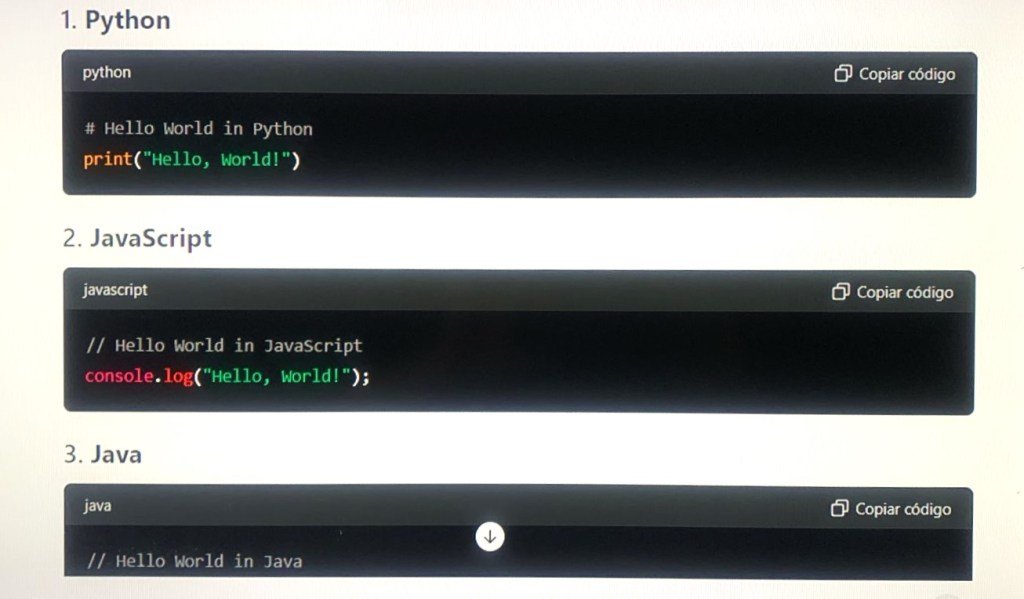
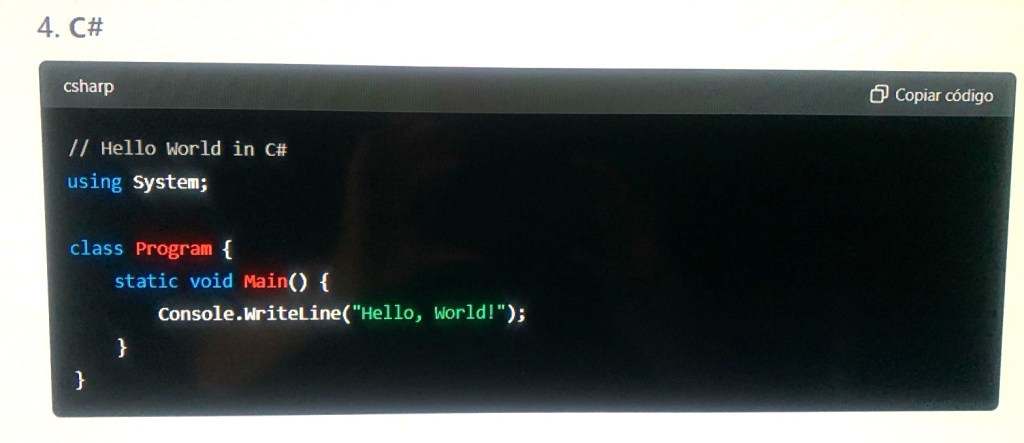
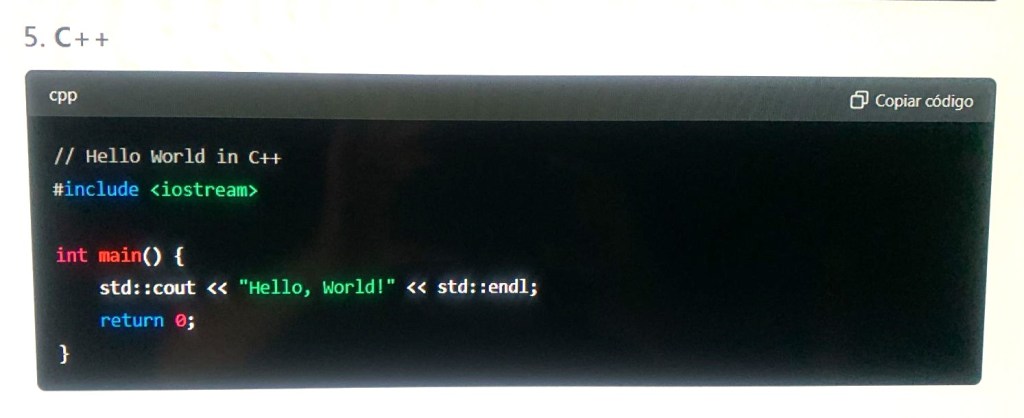
I asked Chat GPT4: Can you program in any of these languages?
The answer was: As an AI developed by OpenAI, I can provide assistance and generate code snippets in many of the popular programming languages listed earlier. Here are examples of simple programs in each language to demonstrate:
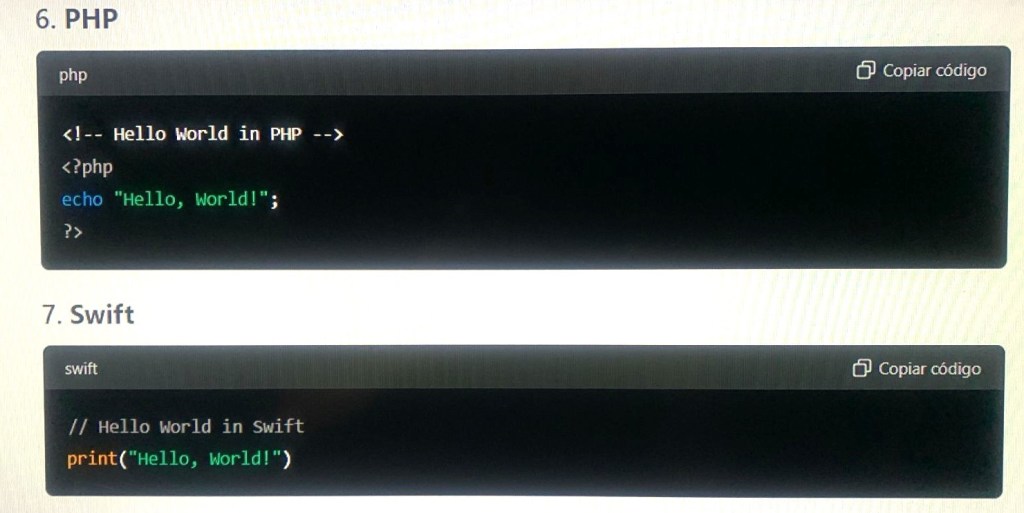
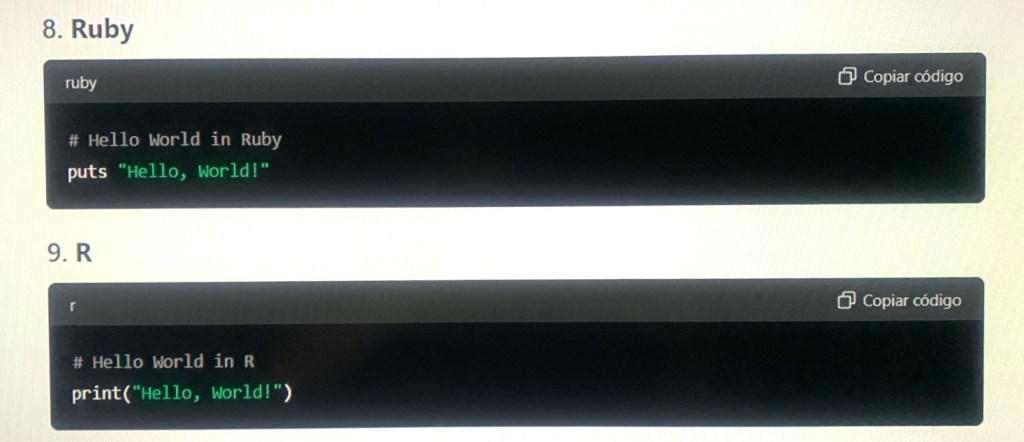

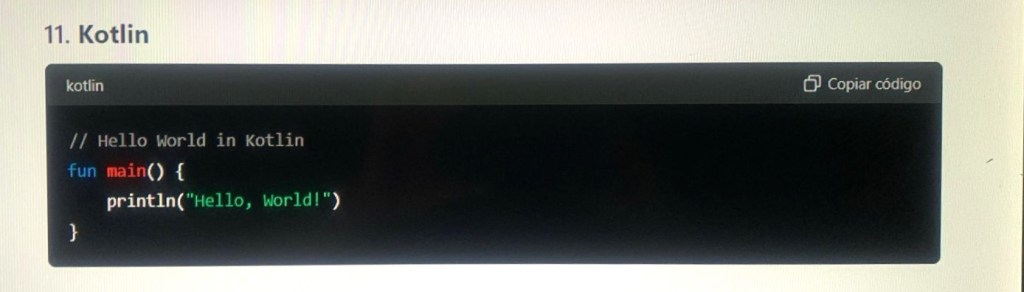
How I Can Help
- Code Generation: I can help generate code snippets, provide explanations, and assist with various programming tasks in these languages.
- Debugging: I can help identify and fix bugs in your code.
- Learning: I can explain concepts and provide examples to help you learn these languages.
- Optimization: I can suggest ways to optimize and improve your code.
If you have specific programming tasks, questions, or need more detailed code examples, feel free to ask!
Last paragraph was posted as “Future” but actually, as of begin of 2024 is available, meaning that the future already started. Actually the help AI provides is more in coding, specially debugging, and is a tool which saves time in programming environments, such as this example, which seems to me very much welcomed, thinking of when we did that in the seventies and eighties, when there was a lot of menial tasks that were tiring, boring and time consuming which you had to do yourself, using “elbow grease”.
It is quite impressive when you see AI providing ready made or helping strongly to write programs in modern languages such as Python, Java, C++, etc. but it is not the same case when it comes to assembler and here are the limitations as of today which I hope will be overcome:
Chat GPT 4 limitations when it comes to assembler
There are a few key limitations when it comes to providing assistance with IBM 360/370 assembler compared to more modern programming languages like Java, Python, or C++. Here are some of the main points:
Key Limitations
- Niche Knowledge:
- Historical and Specialized: IBM 360/370 assembler is quite specialized and considered a legacy language, primarily used in specific industries and systems that require mainframe operations. My training data contains less detailed information on such niche and legacy technologies compared to more widely used modern languages.
- Practical Execution:
- No Execution Environment: I cannot execute or test 360/370 assembler code directly. My capabilities are limited to generating and providing examples, explanations, and guidance based on theoretical knowledge and historical documentation.
- Up-to-date Practices:
- Outdated Context: Modern programming languages and environments are frequently updated, and I have extensive information on current best practices, tools, and libraries. In contrast, the most up-to-date practices for 360/370 assembler are less likely to be as well-documented in recent literature or training data.
- Limited Contextual Information:
- Less Detailed Documentation: Compared to modern languages that have extensive online documentation and community support, detailed information and tutorials on IBM 360/370 assembler can be more limited and harder to find.
Assistance I Can Provide for IBM 360/370 Assembler
- Basic Code Examples:
- I can generate simple IBM 360/370 assembler code snippets and provide examples for basic operations like arithmetic, loops, and branching.
- Conceptual Explanations:
- I can explain fundamental concepts, such as how to use registers, memory addressing, and common instructions in the IBM 360/370 assembler.
- Syntax and Instructions:
- I can help with understanding the syntax and usage of common IBM 360/370 assembler instructions, such as
L(Load),A(Add),ST(Store), and others.
- I can help with understanding the syntax and usage of common IBM 360/370 assembler instructions, such as
- Legacy System Support:
- I can offer general advice on working with legacy systems and suggest strategies for maintaining or migrating code written in IBM 360/370 assembler.
Example: Simple IBM 360/370 Assembler Code
Here’s a basic example of a 360/370 assembler code snippet for a simple task:
Addition of Two Numbers
assembly Copycode         START  0
         USING  *,15
MAIN     LR     15,0          /* Load register 15 with the current address */
         L      1,NUMBER1     /* Load the value at NUMBER1 into register 1 */
         L      2,NUMBER2     /* Load the value at NUMBER2 into register 2 */
         AR     1,2           /* Add the value in register 2 to register 1 */
         ST     1,RESULT      /* Store the result in memory location RESULT */
         END
NUMBER1  DC     F'10'         /* Define constant 10 */
NUMBER2  DC     F'20'         /* Define constant 20 */
RESULT   DS     F             /* Define storage for the result */
         END   MAIN
Summary
While I can help you understand and write basic code in IBM 360/370 assembler, provide explanations, and offer guidance based on available knowledge, my capabilities are more limited compared to more modern and widely-used programming languages. For more complex tasks or detailed system-specific issues, additional resources or expertise in mainframe systems may be required.
Artificial Intelligence programming (Chat GPT)
In its own words:
As an AI developed by OpenAI, I am not programmed in a traditional sense using a single language, but rather built using a complex combination of technologies and methodologies. Here’s a detailed breakdown of the components and languages involved in creating me:
Core Components and Technologies
- Machine Learning Frameworks:
- Python: The primary language used for developing machine learning models. It provides libraries and frameworks like TensorFlow and PyTorch, which are essential for training and deploying deep learning models.
- PyTorch: A popular deep learning framework used for building and training neural networks. It’s known for its flexibility and ease of use in research and production environments.
- TensorFlow: Another widely used deep learning framework that supports a variety of machine learning tasks, from image recognition to natural language processing.
- Training Data and Preprocessing:
- Data Handling: Python, along with libraries like Pandas and NumPy, is used to handle, preprocess, and manipulate large datasets required for training.
- Natural Language Processing (NLP): Techniques for tokenization, stemming, lemmatization, and vectorization are implemented in Python using libraries like NLTK and SpaCy.
- Model Training:
- High-Performance Computing: Training models requires powerful hardware like GPUs and TPUs, which are programmed using low-level languages like CUDA (for NVIDIA GPUs) or specialized frameworks.
- Distributed Computing: Languages and frameworks for managing distributed training across multiple servers include Python-based tools like Ray or Horovod.
- Model Architecture:
- Transformer Models: The underlying architecture, such as the GPT (Generative Pre-trained Transformer), is implemented using deep learning frameworks that support attention mechanisms and large-scale training.
- BERT, GPT: The architecture of models like BERT or GPT involves complex neural networks, primarily constructed and trained using Python frameworks like PyTorch or TensorFlow.
- Deployment and Serving:
- Inference Engines: Python and C++ are often used to create inference engines that optimize and deploy trained models for real-time predictions.
- APIs and Microservices: Languages like Python, Go, and Node.js are used to create APIs and microservices that allow interaction with the AI model over the web.
- Software Engineering and Systems:
- Backend Systems: For handling requests, data storage, and model management, languages like Python, Java, and C++ are used.
- Data Storage: SQL and NoSQL databases (e.g., PostgreSQL, MongoDB) manage the data required for training and deploying AI models.
- Infrastructure: Tools like Docker for containerization and Kubernetes for orchestration, with configuration often handled using languages like YAML or scripting languages like Bash.
- Optimization and Tuning:
- Performance Tuning: Low-level languages like C++ or C are sometimes used for optimizing critical components to enhance performance.
- Hyperparameter Tuning: Python is used extensively for setting up and executing experiments to find the best model parameters.
Summary
In summary, the development of an AI like me involves a combination of languages and technologies, with Python being the primary language for model development, training, and deployment. Other languages like C++, Java, and various scripting languages play crucial roles in different aspects of the system, from backend infrastructure to optimization and scaling.
 O Sentido da Vida - The Meaning of life